

 code /
 /
/  / Learning stenography
80sfy.com, by Art Sangurai, is a pretty cool site if you love synthwave music or the 1980s in general.
It uses a SoundCloud and Giphy combination for maximum AESTHETIC effect to make you FEEL all the nostalgias, which got it a lot of love on Reddit.
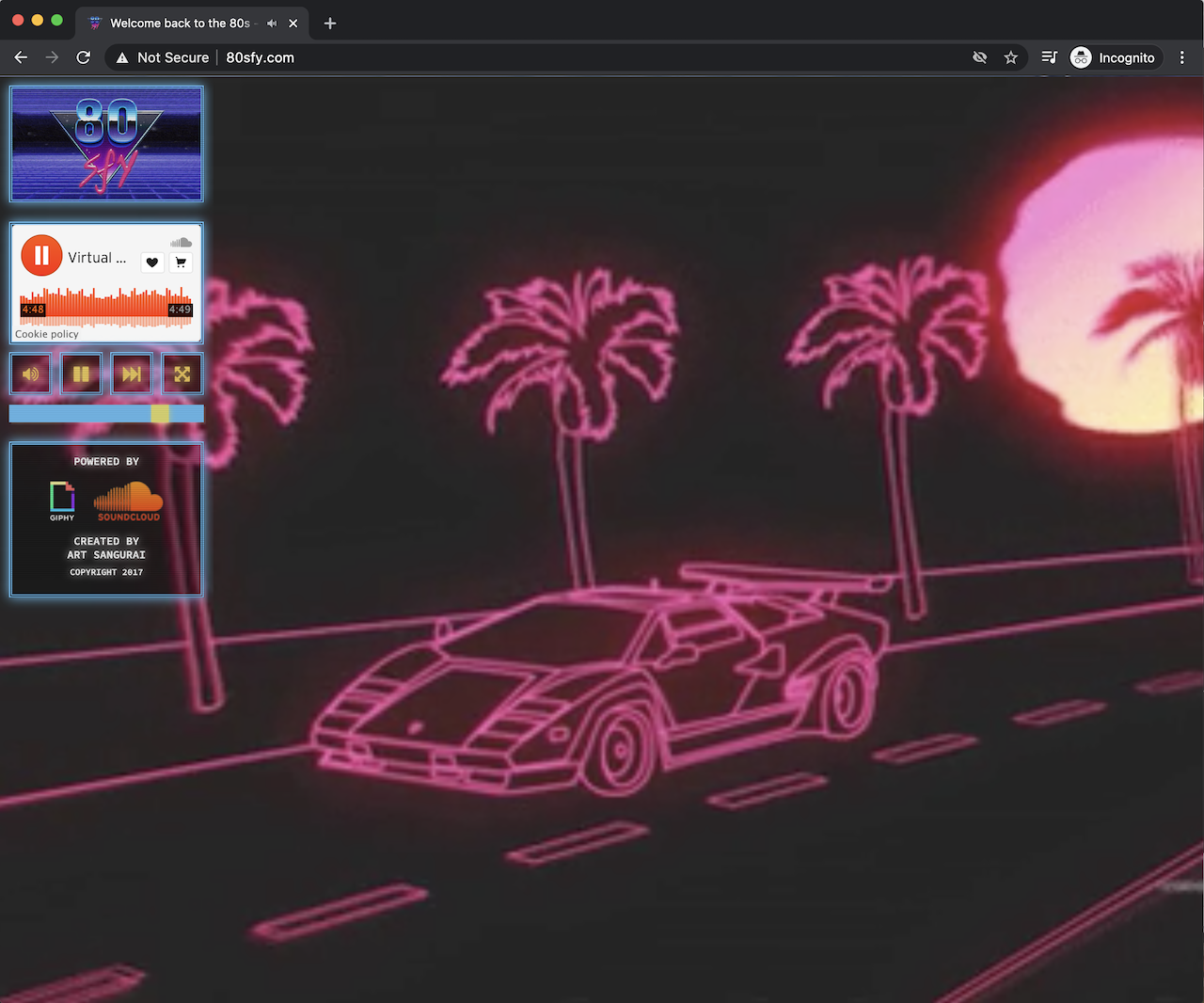
It is programmed primarily in Javascript with the React library. So, I decided to re-create it using Elm because why not, but also just because…
You can see the results of those efforts here:
If the technical details of coding with Elm aren’t your thing, you can stop reading here and just go and enjoy some OUTRUN beats.
Still here? Okay, man, let’s talk some Elm learnings. Open up the codebase and follow along.
First, you gotta do the Random Shuffle

There are two scenarios in the 80sfy application where an element of randomness is required:
- Shuffling the order of tracks to be played in the SoundCloud playlist
- Getting a random animated GIF URL from Giphy: the application supplies a random descriptive tag, and Giphy sends back a URL that is relevant to that tag
Unlike many other programming languages, there is no Math.random() or equivalent function in Elm that allows you to summon random numbers and use them on the spot.
Generating random numbers, or doing anything involving randomness like randomly shuffling or picking an item from a list, is the responsibility of the Elm Runtime. In order get a random number, you need to:
- code up a description of the kind of random number you want to generate
- send that description off to the Elm Runtime as a
Cmdto have the number generated for you - handle the resulting message you get returned from Elm Runtime containing the random number
Creating a Random List of Numbers
Let’s have a look at a simplified-down example of the first scenario for randomising the order of tracks in a playlist. First though, a bit of context around how the SoundCloud IFrame widget interacts with the Elm application.
The SoundCloud Widget API has a getSounds(callback) method that returns the list of sound objects in its playlist. In the Elm application, though, we do not need all of that information: as long as we can get the length of the widget’s playlist, we can build up our own list of integer track indexes to determine the order that tracks should play.
When the Elm application wants to tell the SoundCloud player to play a track, it sends over an index number n, and the SoundCloud player “skips” over to track n in its playlist.
So, let’s pick up our story at the point when an Elm Subscription has:
- received the
playlistLengthvia an incoming Port message from Javascript (much more to say about ports later…) - wrapped it in a
PlaylistLengthFetchedmessage - sent the message off to the Elm Runtime…
- …which is then handled in the
updatefunction for theAudioPlayer
update : Msg -> AudioPlayer -> ( AudioPlayer, Cmd Msg )
update msg audioPlayer =
    case msg of
        -- ...
        PlaylistLengthFetched playlistLength ->
            let
                generatePlaylist : Cmd Msg
                generatePlaylist =
                    Playlist.generate playlistLength
            in
            ( { audioPlayer | playlistLength = playlistLength }
            , generatePlaylist
            )
Here, the playlistLength value is passed off to a Playlist.generate function, which defines the generation of a shuffled list of track indexes, and returns a Cmd to get the Elm Runtime to do the work of actually generating the playlist. Let’s have a look at how that randomness is created:
module Playlist exposing
    ( generate
    , -- ...
    )

import Random exposing (Generator)
import Random.List

-- ...

generate : Int -> Cmd Msg
generate playlistLength =
    let
        trackList : List Int
        trackList =
            List.range 0 (playlistLength - 1)

        generator : Generator (List Int)
        generator =
            Random.List.shuffle trackList
    in
    Random.generate PlaylistGenerated generator
Here, we specify that:
-
List.rangeshould build a simple list of integers - the
Random.List.shufflefunction from theRandom.Extrapackage, which returns aGeneratorfrom theRandompackage, should shuffle the list
We now have our recipe defined for the generator (how we want a random number generated), so we:
- specify that we want to have the generated playlist sent back to us from the Elm Runtime wrapped in a
PlaylistGeneratedmessage (defined asPlaylistGenerated (List Int)so the message has a place to hold the playlist) - send it off to the Elm Runtime with the
Random.generatefunction - handle the
PlaylistGeneratedmessage from the Elm Runtime in theupdatefunction
update : Msg -> AudioPlayer -> ( AudioPlayer, Cmd Msg )
update msg audioPlayer =
    case msg of
        -- ...
        PlaylistGenerated generatedPlaylist ->
            let
                ( playlist, cmd ) =
                    Playlist.handleNextTrackNumberRequest
                        generatedPlaylist
                        audioPlayer.playlistLength
            in
            ( { audioPlayer | playlist = playlist }, cmd )
The details of the Playlist.handleNextTrackNumberRequest function are not needed for this example, but it essentially pops off the first number in the randomised generatedPlaylist, tells the SoundCloud widget to play the track in its playlist located at that index, and stores the remaining playlist in the audioPlayer model.
But, the main point here is that we have requested the Elm Runtime to generate a random list of integers for us, it has done so, and we have been able to store it in our model! If you want to dig deeper, check out the real Playlist code.
We have covered audio playlist generation, but in this application, you cannot have random tracks without random GIFs as well! This time though, rather than generate a list, we want to be able to randomly pick a tag from a static list and send it off to Giphy, so let’s see how to do that.
Randomly Picking from a List
When the 80sfy application first starts, it goes and fetches a list of descriptive string tags from a local tags.json file, emitting a TagsFetched message once that has been attempted, which is then handled in the update function for the application’s SecretConfig model (have you found the application’s secret config yet…?  ) in a similar way to the following:
update : Msg -> SecretConfig -> ( Config, Cmd Msg )
update msg secretConfig =
    case msg of
        -- ...
        TagsFetched (Ok tags) ->
            let
                generateRandomTagForVideoPlayer : String -> Cmd Msg
                generateRandomTagForVideoPlayer videoPlayerId =
                    Tag.generateRandomTag videoPlayerId tags

                -- ...
            in
            ( { secretConfig | tags = tags }
            , Cmd.batch
                [ generateRandomTagForVideoPlayer "1"
                , generateRandomTagForVideoPlayer "2"
                , -- ...
                ]
            )

        TagsFetched (Err error) ->
            -- ...
Once the tags have been read in, we store them in the secretConfig model, and then send out two Cmds to generate random tags, one for each videoPlayer in the application (yes, there are two, which crossfade between each other).
Let’s take a closer look at the Tag.generateRandomTag function, that, like the Playlist.generate function earlier, is responsible for creating a random generator:
module Tag exposing
    ( generateRandomTag
    , -- ...
    )

import Random
-- ...


generateRandomTag : String -> List String -> Cmd Msg
generateRandomTag videoPlayerId tags =
    let
        tagsLength : Int
        tagsLength =
            List.length tags - 1

        randomTagIndex : Generator Int
        randomTagIndex =
            Random.int 0 tagsLength

        generator : Generator String
        generator =
            Random.map (atIndex tags) randomTagIndex

        randomTagGeneratedMsg : String -> Msg
        randomTagGeneratedMsg =
            (RandomTagGenerated videoPlayerId)
    in
    Random.generate randomTagGeneratedMsg generator


atIndex : List String -> Int -> String
atIndex tags index =
    let
        defaultTag : String
        defaultTag =
            "80s"
    in
    tags
        |> List.drop index
        |> List.head
        |> Maybe.withDefault defaultTag
It looks like randomly picking from a static list is a little bit more involved than generating a new random list. So, what’s going on?
- We specify that
Random.intshould generate a random index number between zero and the length of thetagslist - We then use
Random.mapto create the generator that transforms that random index into the tag at therandomTagIndexof thetagslist. (All lists in Elm are linked lists, with the potential to containNothingwhen we interrogate their contents, which explains the ceremony contained in theatIndexfunction, and why we cannot just write something liketags[index]) - We then specify that we want to have the tag sent back to us wrapped in a
RandomTagGeneratedmessage (defined asRandomTagGenerated String Stringso the message has a place to hold both thevideoPlayerIdthe tag is for, as well as the generated tag itself) - Finally, like in the previous example, we call
Random.generatewith the message to be handled in theupdatefunction, and thegeneratoritself
The RandomTagGenerated message is then handled in the update function as follows:
update : Msg -> Config -> ( Config, Cmd Msg )
update msg config =
    case msg of
        -- ...
        RandomTagGenerated videoPlayerId tag ->
            let
                randomGifUrlFetchedMsg : Result Error String -> Msg
                randomGifUrlFetchedMsg =
                    RandomGifUrlFetched videoPlayerId

                fetchRandomGifUrl : Cmd Msg
                fetchRandomGifUrl =
                    Gif.fetchRandomGifUrl
                        randomGifUrlFetchedMsg
                        config.giphyApiKey
                        tag
            in
            ( config, fetchRandomGifUrl )
Once the Elm Runtime returns the randomly generated tag in the RandomTagGenerated message, along with the videoPlayerId we specified ourselves in the generateRandomTag function, we use a Gif.fetchRandomGifUrl function to make a HTTP call out to Giphy to request a GIF URL (details of which are available in the codebase, but check out the the real Tag code for the details on picking random tags).

For more information on random generators, see the The Elm Guide’s Random section. If these two examples were too scoff-inducing-ly simple and you want some Hard Mode in your randomness, go check out Charlie Koster’s article Randomness in Elm, and let him bend your mind a bit.
I am a Msg, like my Father before me
The Elm guide is quite opinionated about Elm application structuring. While it advocates less structure and longer files, I find that as an application grows, I definitely prefer more structure and smaller files.
I like to have thematically-related functions grouped together, just to aid in my own understanding of the code at a glance, which seems to push me towards what would seem to be considered a React-style(?) “components” way of thinking, so I will often use that word when referring to what are essentially the different “parts” of the application.
In my mind, the 80sfy application has a few “main” components in it:
AudioPlayerVideoPlayerControlPanelSecretConfig
When you press the “Play” button on the control panel, you start playing the audio and start playing the GIF videos, so these different parts of the application need to be able to communicate with each other.
Of course all of these messages can live at the “top level” of the application, and the handling for every one of those messages can live inside one big update function. However, there are times where I would rather have a separate AudioPlayer.Update “child” file, with its own update function, to handle thematically-similar messages specifically targeted at the AudioPlayer from the “parent” update function, and a similar structure for the other components.
The main update function can be the “trunk” of the application tree, which can handle its own top level messages, and each named component can have its own separate update function that “branches off” that trunk. Each component branch can emit messages that communicate back up to the parent trunk itself, or to other sibling branch components via the parent trunk.
This kind of concept is explained in a way that resonated with me in The Translator Pattern: a model for Child-to-Parent Communication in Elm by Alex Lew. The “translator”, in this context, refers to a function that uses a dictionary of parent-level message types to “translate” child-level messages into parent-level messages. The burden of performing a message “translation” lies with the parent update function, before it is able to send any Cmds off to the Elm Runtime.
I really liked the idea of some sort of parent-level message dictionary that child components could leverage when they generate Cmds, but I found I needed to slightly tweak the way that parent-child Msg/Cmd communication occurred, compared to Alex’s blog post, to get it all making sense in my own head.
So, let’s see how this way of thinking works in practice in the 80sfy application. I have adopted a naming convention of Msgs for the type alias that defines a record containing a list of all the top-level Msgs in the application, and dictionary for the function that returns the Msgs dictionary itself:
src/Msg.elm
module Msg exposing (Msg(..), Msgs, dictionary)

import AudioPlayer
import ControlPanel
import Key exposing (Key)
import Ports
import SecretConfig
import Time exposing (Posix)
import VideoPlayer


type Msg
    = AudioPlayer AudioPlayer.Msg
    | ControlPanel ControlPanel.Msg
    | CrossFadePlayers Posix
    | KeyPressed Key
    | NoOp
    | Pause
    | Ports Ports.Msg
    | SecretConfig SecretConfig.Msg
    | ShowApplicationState
    | VideoPlayer VideoPlayer.Msg


type alias Msgs =
    { audioPlayerMsg : AudioPlayer.Msg -> Msg
    , controlPanelMsg : ControlPanel.Msg -> Msg
    , crossFadePlayersMsg : Posix -> Msg
    , keyPressedMsg : Key -> Msg
    , noOpMsg : Msg
    , pauseMsg : Msg
    , portsMsg : Ports.Msg -> Msg
    , secretConfigMsg : SecretConfig.Msg -> Msg
    , showApplicationStateMsg : Msg
    , videoPlayerMsg : VideoPlayer.Msg -> Msg
    }


dictionary : Msgs
dictionary =
    { audioPlayerMsg = AudioPlayer
    , controlPanelMsg = ControlPanel
    , crossFadePlayersMsg = CrossFadePlayers
    , keyPressedMsg = KeyPressed
    , noOpMsg = NoOp
    , pauseMsg = Pause
    , portsMsg = Ports
    , secretConfigMsg = SecretConfig
    , showApplicationStateMsg = ShowApplicationState
    , videoPlayerMsg = VideoPlayer
    }
The Msgs in the dictionary are a mix of “top-level”-only messages, like CrossFadePlayers Posix or NoOp, and messages like AudioPlayer AudioPlayer.Msg, where the “top-level” or “parent” part of the message is meant to indicate which component’s update function the message should be sent to (AudioPlayer), and the constructor parameter (AudioPlayer.Msg) is the specific message to be handled by the child component’s update function.
The dictionary is initialised as soon as the application starts, in the main function, and is passed into every function that needs to send top-level messages (ie all of them):
src/Main.elm
module Main exposing (main)

import Browser
import Flags exposing (Flags)
import Model exposing (Model)
import Msg exposing (Msg, Msgs)
import Subscriptions
import Update
import View
-- ...


main : Program Flags Model Msg
main =
    let
        msgs : Msgs
        msgs =
            Msg.dictionary
    in
    Browser.document
        { init = init
        , update = Update.update msgs
        , view = View.view msgs
        , subscriptions = Subscriptions.subscriptions msgs
        }

-- ...
At this point, your spidey-sense may be tingling regarding passing in a record of global context this large (I do not consider it “global state” as-such since the dictionary content will never be transformed or “changed”) to the three main sections of the application.
Surely all ten Msg types in the dictionary are not needed in every section of the application, right…? Correct, and that’s why we are going to lean on Elm’s Extensible Records types to help “filter” this dictionary down to the bare minimum of top-level messages that each part of the application needs to use.
Let’s see what this looks like in the top-level Update function:
src/Update.elm
module Update exposing (update)

-- ...

type alias Msgs msgs =
    { msgs
        | audioPlayerMsg : AudioPlayer.Msg -> Msg
        , pauseMsg : Msg
        , portsMsg : Ports.Msg -> Msg
        , secretConfigMsg : SecretConfig.Msg -> Msg
        , videoPlayerMsg : VideoPlayer.Msg -> Msg
    }


update : Msgs msgs -> Msg -> Model -> ( Model, Cmd Msg )
update parentMsgs msg model =
    -- ...
The Update module essentially re-defines the type of the Msgs record that is passed to it, restricting its entries down to only those top-level messages that it needs to care about. This helps to keep the record content more focused, and feel a bit less heavy than the record with ten entries that was originally passed in.
We got a 50% reduction in entries from the original record in the Update module, so let’s see how much of one we get in the View and Subscriptions:
src/View.elm
module View exposing (view)

-- ...

type alias Msgs msgs =
    { msgs
        | audioPlayerMsg : AudioPlayer.Msg -> Msg
        , controlPanelMsg : ControlPanel.Msg -> Msg
        , noOpMsg : Msg
        , pauseMsg : Msg
        , portsMsg : Ports.Msg -> Msg
        , secretConfigMsg : SecretConfig.Msg -> Msg
        , showApplicationStateMsg : Msg
        , videoPlayerMsg : VideoPlayer.Msg -> Msg
    }


view : Msgs msgs -> Model -> Document Msg
view msgs model =
    -- ...
src/Subscriptions.elm
module Subscriptions exposing (subscriptions)

-- ...

type alias Msgs msgs =
    { msgs
        | audioPlayerMsg : AudioPlayer.Msg -> Msg
        , controlPanelMsg : ControlPanel.Msg -> Msg
        , crossFadePlayersMsg : Posix -> Msg
        , keyPressedMsg : Key -> Msg
        , noOpMsg : Msg
        , portsMsg : Ports.Msg -> Msg
        , videoPlayerMsg : VideoPlayer.Msg -> Msg
    }


subscriptions : Msgs msgs -> Model -> Sub Msg
subscriptions msgs model =
    -- ...
The reduction in entries is not quite as great for these two modules, but at least there is a reduction, and the record can only get smaller as it gets passed down further into child components.
As an example, let’s follow the journey of the Msgs record as it gets passed down into the AudioPlayer child component from the Update module:
src/Update.elm
module Update exposing (update)

import AudioPlayer
-- ...

type alias Msgs msgs =
    -- ...

update : Msgs msgs -> Msg -> Model -> ( Model, Cmd Msg )
update parentMsgs msg model =
    case msg of
        Msg.AudioPlayer msgForAudioPlayer ->
            let
                ( audioPlayer, cmd ) =
                    AudioPlayer.update
                        parentMsgs
                        msgForAudioPlayer
                        model.audioPlayer
            in
            ( { model | audioPlayer = audioPlayer }, cmd )
        -- ...
The parentMsgs are passed into the AudioPlayer.update function, along with whatever msgForAudioPlayer needs to be handled there, as well as the model.audioPlayer, which for all intents and purposes becomes the “model” for the AudioPlayer component.
Let’s see how the type definition has changed for the Msgs in the AudioPlayer component. The AudioPlayer.elm file acts as the gateway to all audio player-related functionality, with implementation details all hidden away in sub-modules (which we will talk about in more detail later on):
src/AudioPlayer.elm
module AudioPlayer exposing
    ( AudioPlayer
    , Msg
    , update
    -- ...
    )

import AudioPlayer.Model as Model
import AudioPlayer.Msg as Msg
import AudioPlayer.Update as Update
-- ...

type alias AudioPlayer =
    Model.AudioPlayer

type alias Msg =
    Msg.Msg

-- ...

update : Update.ParentMsgs msgs msg -> Msg -> AudioPlayer -> ( AudioPlayer, Cmd msg )
update parentMsgs msg audioPlayer =
    Update.update parentMsgs msg audioPlayer
The update function simply calls the AudioPlayer’s own internal Update.update function, but the thing to notice here, is that parentMsgs is now defined in terms of a Update.ParentMsgs msgs msg type: a further-filtered, child-component-defined record type that only contains the parentMsgs that the AudioPlayer’s update function needs to use.
Notice also that the AudioPlayer.update is returning a lower-cased Cmd msg, as apposed to the Cmd Msg in Update.update. The msg here is a type variable that can technically match any type, but in this case it must match one of the types contained in parentMsgs, hence the msg in the Update.ParentMsgs msgs msg declaration. The child component does not know the specifics about the parent messages: it just knows that it needs to return the type of message that the parent is expecting to get back.
Let’s see what the Update.ParentMsgs msgs msg look like now:
src/AudioPlayer/Update.elm
module AudioPlayer.Update exposing (ParentMsgs, update)

import AudioPlayer.Model as Model exposing (AudioPlayer)
import AudioPlayer.Msg as Msg exposing (Msg)
-- ...


type alias ParentMsgs msgs msg =
    { msgs
        | audioPlayerMsg : Msg -> msg
    }


update : ParentMsgs msgs msg -> Msg -> AudioPlayer -> ( AudioPlayer, Cmd msg )
update { audioPlayerMsg } msg audioPlayer =
    -- ...
The record has been reduced down to a single entry, the audioPlayerMsg, which is defined from the child component’s perspective as being as a function that takes one of the AudioPlayer’s own Msg types, and returns some kind of msg type from its parent that it does not know the details of.
This declaration mirrors the same function from the parent Update module’s perspective, AudioPlayer.Msg -> Msg, a function that takes in some message internal-to-AudioPlayer, returning a concrete Msg type.
The existence of the Update.ParentMsgs alias belies the existence of similar aliases for a child component’s View and Subscriptions functions. For example, staying with the AudioPlayer, we find this definition for the subscriptions function:
src/AudioPlayer.elm
module AudioPlayer exposing
    ( AudioPlayer
    , Msg
    , subscriptions
    -- ...
    )

import AudioPlayer.Model as Model
import AudioPlayer.Subscriptions as Subscriptions
-- ...

type alias AudioPlayer =
    Model.AudioPlayer

-- ...

subscriptions : Subscriptions.ParentMsgs msgs msg -> AudioPlayer -> Sub msg
subscriptions parentMsgs audioPlayer =
    Subscriptions.subscriptions parentMsgs audioPlayer
And the Subscriptions.ParentMsgs msgs msg is defined as:
src/AudioPlayer/Subscriptions.elm
module AudioPlayer.Subscriptions exposing (ParentMsgs, subscriptions)

import AudioPlayer.Model exposing (AudioPlayer)
import AudioPlayer.Msg as Msg exposing (Msg)
-- ...


type alias ParentMsgs msgs msg =
    { msgs
        | audioPlayerMsg : Msg -> msg
        , noOpMsg : msg
    }


subscriptions : ParentMsgs msgs msg -> AudioPlayer -> Sub msg
subscriptions parentMsgs audioPlayer =
    -- ...
Similar to Update.ParentMsgs, Subscriptions.ParentMsgs restricts the passed in parentMsgs record to only a small subset of entries, including the noOpMsg, which it only knows as some msg type variable, without knowing its specific details.
All of the other child components in the 80sfy application handle the Msgs record in a similar way, concerning themselves only with the parent messages that they themselves use.
With regards to how these parent messages are used inside of views, and how they wrap their child messages, let’s have a look at an example in the user interface code for the play/pause button in the ControlPanel:
src/ControlPanel/View/Controls.elm
module ControlPanel.View.Controls exposing (view)

import AudioPlayer exposing (AudioPlayer)
import ControlPanel.View.Styles as Styles
import Html.Styled exposing (Html, div, i)
import Html.Styled.Attributes exposing (attribute, class, css)
import Html.Styled.Events exposing (onClick)
import Ports


type alias ParentMsgs msgs msg =
    { msgs
        | audioPlayerMsg : AudioPlayer.Msg -> msg
        , pauseMsg : msg
        , portsMsg : Ports.Msg -> msg
    }


type alias Context a =
    { a | audioPlayer : AudioPlayer }


view : ParentMsgs msgs msg -> Context a -> Html msg
view parentMsgs { audioPlayer } =
    let
        -- ...

        playing : Bool
        playing =
            AudioPlayer.isPlaying audioPlayer
    in
    div
        [ css [ Styles.controls ]
        , attribute "data-name" "controls"
        ]
        [ playPauseButton parentMsgs playing
        -- ...
        ]

-- ...

playPauseButton : ParentMsgs msgs msg -> Bool -> Html msg
playPauseButton { pauseMsg, portsMsg } playing =
    let
        ( iconClass, playPauseMsg ) =
            if playing then
                ( "fas fa-pause", pauseMsg )

            else
                ( "fas fa-play", portsMsg Ports.playMsg )
    in
    div
        [ css [ Styles.button ]
        , attribute "data-name" "play-pause"
        , onClick playPauseMsg
        ]
        [ div [ css [ Styles.iconBackground ] ] []
        , i [ css [ Styles.icon ], class iconClass ] []
        ]
Looking specifically at the playPauseButton function, and the value that is supplied to the onClick function, we can see that:
- if the player is currently
playing, the parameter-less parent messagepauseMsg(read:Pause) gets sent as-is to be handled in the top-levelUpdate.updatefunction - otherwise, if the player is stopped, we fetch the
PlayMsgfrom thePortsmodule (Ports.playMsg), give that as a parameter to theportsMsgmessage (read:Ports Play), and send that off to be handled inUpdate.updateas a message to be forwarded off to thePorts“child component” for further handling (much more will be written about thePortscomponent later on…)

As you can see, if you want to split your Elm application out into discrete parts/components, there is a potential complexity/maintenance cost associated with doing so.
I am prepared to pay this cost since this way of doing things makes sense to me as an application grows. Given this subjective viewpoint, and the fact that the Elm Guide would seem to consider this way of doing things to be off the “golden path”, definitely consider whether this approach is right for you, your team, and your application.
Say “hello” to my little façade

The façade pattern is probably my favourite software-design pattern, and I try and use it wherever it makes sense to make interfaces to different parts of a system more straightforward.
One of my software pet peeves is seeing one part of a system be able to break boundaries and reach down with impunity into the internals of another part of a system it has no business knowing about.
There are no natural barriers to handing out this kind of impunity in Elm, but at least the elm-review-indirect-internal rule, for use with the fantastic elm-review tool, can slap you on the wrist if you attempt to try.
In the previous section, you saw part of how I tried to put a “hard” interface in the AudioPlayer module. Let’s go back and re-open up that file, but instead have a scan of its entire content. For our purposes here, what the functions do is not important.
The main points are that there is no implementation code, all functions are simply one-line delegations out to sub-modules, and any other module in the application only needs to import the AudioPlayer module to interface with its functionality:
src/AudioPlayer.elm
module AudioPlayer exposing
    ( AudioPlayer
    , AudioPlayerId
    , AudioPlayerVolume
    , Msg
    , -- ...
    )

import AudioPlayer.Model as Model
import AudioPlayer.Msg as Msg
import AudioPlayer.Playlist as Playlist
import AudioPlayer.Status as Status exposing (Status)
import AudioPlayer.Subscriptions as Subscriptions
import AudioPlayer.Task as Task
import AudioPlayer.Update as Update
import AudioPlayer.Volume as Volume
import Ports exposing (SoundCloudWidgetPayload)
import SoundCloud exposing (SoundCloudPlaylistUrl)


type alias AudioPlayer =
    Model.AudioPlayer


type alias AudioPlayerId =
    Model.AudioPlayerId


type alias AudioPlayerVolume =
    Volume.AudioPlayerVolume


type alias Msg =
    Msg.Msg


type alias TrackIndex =
    Playlist.TrackIndex


init : SoundCloudPlaylistUrl -> AudioPlayer
init soundCloudPlaylistUrl =
    Model.init soundCloudPlaylistUrl


adjustVolumeMsg : (Msg -> msg) -> String -> msg
adjustVolumeMsg audioPlayerMsg sliderVolume =
    Msg.adjustVolume audioPlayerMsg sliderVolume


isMuted : AudioPlayer -> Bool
isMuted audioPlayer =
    Status.isMuted audioPlayer.status


isPlaying : AudioPlayer -> Bool
isPlaying audioPlayer =
    Status.isPlaying audioPlayer.status


nextTrackMsg : Msg
nextTrackMsg =
    Msg.NextTrack


performAudioPlayerReset : (Msg -> msg) -> SoundCloudPlaylistUrl -> Cmd msg
performAudioPlayerReset audioPlayerMsg soundCloudPlaylistUrl =
    Task.performAudioPlayerReset audioPlayerMsg soundCloudPlaylistUrl


performNextTrackSelection : (Msg -> msg) -> Cmd msg
performNextTrackSelection audioPlayerMsg =
    Task.performNextTrackSelection audioPlayerMsg


performVolumeAdjustment : (Msg -> msg) -> String -> Cmd msg
performVolumeAdjustment audioPlayerMsg sliderVolume =
    Task.performVolumeAdjustment audioPlayerMsg sliderVolume


rawId : AudioPlayerId -> String
rawId audioPlayerId =
    Model.rawId audioPlayerId


rawTrackIndex : TrackIndex -> Int
rawTrackIndex trackIndex =
    Playlist.rawTrackIndex trackIndex


rawVolume : AudioPlayerVolume -> Int
rawVolume audioPlayerVolume =
    Volume.rawVolume audioPlayerVolume


soundCloudWidgetPayload : AudioPlayer -> SoundCloudWidgetPayload
soundCloudWidgetPayload audioPlayer =
    Model.soundCloudWidgetPayload audioPlayer


statusToString : Status -> String
statusToString status =
    Status.toString status


subscriptions : Subscriptions.ParentMsgs msgs msg -> AudioPlayer -> Sub msg
subscriptions parentMsgs audioPlayer =
    Subscriptions.subscriptions parentMsgs audioPlayer


toggleMuteMsg : Msg
toggleMuteMsg =
    Msg.ToggleMute


update : Update.ParentMsgs msgs msg -> Msg -> AudioPlayer -> ( AudioPlayer, Cmd msg )
update parentMsgs msg audioPlayer =
    Update.update parentMsgs msg audioPlayer
It would be nice if Elm had built-in syntactic sugar similar to, say, Elixir’s defdelegate(funs, opts) function, in order to prevent the need to write function delegations “longhand”. But, leaving that aside, here are a few points worth bringing up regarding this file, as well as the general architecture of the application:
- Within the
AudioPlayermodule,importing sub-modules (AudioPlayer.Xmodules) is unrestricted, but content from any other named module is only accessible via its top-level module (eg no reaching intoPorts.MsgfromAudioPlayer) - Types defined in sub-modules may be exposed via the top-level module as
type aliases (egAudioPlayer,Msgetc). So, as far as other top-level modules are concerned, if they import theAudioPlayertype, the fact that the type is actually defined inAudioPlayer.Modelis unknowable implementation detail behind the API wall: they just see theAudioPlayertype coming in from theAudioPlayermodule - Wherever possible, I have tried to make
typesbe Opaque Types in order to hide their constructors, and further enforce boundaries on implementation details (even amongst sibling modules; see, for example, theStatustype inAudio.Status).
The major exception to this would be theMsgtype, which, similar to every otherMsgin the application, needed to be exposed asMsg(..)fromAudioPlayer.Msgso it could be used specifically for pattern matching inAudioPlayer.Updatefiles, and consequently referenced directly as return values in functions likenextTrackMsgandtoggleMuteMsg. But, just like any other type defined in a sub-module, if theMsgis to be exposed via the top-level module, it must only be via atype alias
All of the other modules in the 80sfy application that have enough internal implementation details to split out into sub-modules follow these patterns.
The Elm Guide would probably call all this façade-component application structuring a reflection of my programming “culture shock”. I think the points made in that section of the guide are reasonable, but I honestly just cannot agree with its advice of big files and comment header delimiters. I just want my code to be legible (and hopefully not just to me), and I currently think that this kind of structure can help in that goal.
You can be my wrapped type anytime

Writing this application got me to become a big fan of Wrapped Custom Types, not just for the extra type safety, but also for the clarity they help give record type alias and Msg constructor definitions.
Before I knew about wrapped types, the AudioPlayer model looked like the following:
src/AudioPlayer/Model.elm
type alias AudioPlayer =
    { id : String
    , playlist : List Int
    , playlistLength : Int
    , soundCloudIframeUrl : String
    , status : Status
    , volume : Int
    }
At face value, this could be considered reasonable, but is the AudioPlayer’s id really the same kind of thing as its soundCloudIframeUrl? Are the Ints in the playlist really the same kind of Ints as the volume? Should they be…?
After trying out creating some types to wrap the basic types, the AudioPlayer model was transformed into:
type alias AudioPlayer =
    { id : AudioPlayerId
    , playlist : List TrackIndex
    , playlistLength : Int
    , soundCloudIframeUrl : SoundCloudIframeUrl
    , status : Status
    , volume : AudioPlayerVolume
    }
I think that this model with wrapped types conveys more meaning than the one with just basic types. So, I pretty much went all around the application codebase and wrapped every type I could that made sense, resulting in a total of 12 wrapped types created for 80sfy.

In the land of wrapped types, though, conveying meaning does exert an overhead cost. For example, let’s have a look at the ceremony required to wrap and unwrap a TrackIndex:
src/AudioPlayer/Playlist.elm
module AudioPlayer.Playlist exposing
    ( TrackIndex
    , -- ...
    , rawTrackIndex
    , trackIndex
    )


type TrackIndex
    = TrackIndex Int

-- ...

trackIndex : Int -> TrackIndex
trackIndex rawTrackIndexInt =
    TrackIndex rawTrackIndexInt

rawTrackIndex : TrackIndex -> Int
rawTrackIndex (TrackIndex rawTrackIndexInt) =
    rawTrackIndexInt
The AudioPlayer’s playlist field must contain a List TrackIndex, therefore:
- every “raw” track index
Intthat goes into the list must first be wrapped by callingPlaylist.trackIndex rawTrackIndexInt. - if you ever want to do something with the “raw”
Intvalue inside of a track index, then you have to unwrap it by callingPlaylist.rawTrackIndex trackIndex
So, wouldn’t it be easier to just…not have wrapped types here? Yes, it would! But, this is the cost of adding (admittedly subjective) clarity to model types, and it is up to you to decide whether doing this is meaningful and worth the cost of admission.
Since the above example acts like some kind of wardrobe for an Int, putting on and taking off a TrackIndex-coloured coat without any change to the underlying raw value, let’s have a look at some other scenarios where constraints or validation for the raw value are being added to the wrapping process.
The SecretConfig model contains the following values that can be populated by user input:
src/SecretConfig/Model.elm
type alias SecretConfig =
    { gifDisplayIntervalSeconds : GifDisplayIntervalSeconds
    , soundCloudPlaylistUrl : SoundCloudPlaylistUrl
    -- ...
    }
These types wrap around a Float and a String respectively, but because we cannot trust anything given to us by our hostile, power-suit-toting users, we need conditions on the raw values that serve as barriers to the wrapped types being created:
src/Gif.elm
module Gif exposing
    ( GifDisplayIntervalSeconds
    , displayIntervalSeconds
    , -- ...
    )


type GifDisplayIntervalSeconds
    = GifDisplayIntervalSeconds Float

-- ...

displayIntervalSeconds : Float -> Maybe GifDisplayIntervalSeconds
displayIntervalSeconds rawDisplayIntervalSecondsFloat =
    if rawDisplayIntervalSecondsFloat > 0 then
        Just (GifDisplayIntervalSeconds rawDisplayIntervalSecondsFloat)

    else
        Nothing
A non-positive display interval between animated GIFs does not make sense, so we only wrap positive values, and give malicious users Nothing.
Assuming that this is the only function we create to return new GifDisplayIntervalSeconds types, we build in some guarantees around the validity of raw values wrapped in a GifDisplayIntervalSeconds type that we could not get if it was a basic Float type.
Similarly, a SoundCloudPlaylistUrl isn’t just any kind of String: it must have a correct prefix. If the raw value does, it gets wrapped; if not, Nothing:
src/SoundCloud/Url.elm
module SoundCloud.Url exposing
    ( SoundCloudPlaylistUrl
    , playlistUrl
    , -- ...
    )


type SoundCloudPlaylistUrl
    = SoundCloudPlaylistUrl String

-- ...

playlistUrl : String -> Maybe SoundCloudPlaylistUrl
playlistUrl rawSoundCloudPlaylistUrlString =
    let
        playlistUrlPrefix : String
        playlistUrlPrefix =
            "https://api.soundcloud.com/"

        isValidUrl : Bool
        isValidUrl =
            String.startsWith playlistUrlPrefix rawSoundCloudPlaylistUrlString
    in
    if isValidUrl then
        Just (SoundCloudPlaylistUrl rawSoundCloudPlaylistUrlString)

    else
        Nothing
As you can see, Wrapped Types can provide more than just a fancy enclosure to a basic type. Aside from improvements in type readability, they can help assert the validity of the wrapped raw values, so I would highly recommend giving them a try in your own Elm codebases!
Ports? Where we’re going we don’t need ports

My usage of ports in Elm applications previous to 80sfy was essentially as remote function calls out to the impure badlands of Javascript.
For every kind of operation I needed to leverage Javascript for, I would poke a port-shaped hole in the Elm application boundary, do the minimum amount of work in Javascript-land, and return control quickly to the pure, type-safe Elm application fortress.
For example, previous iterations of port-related code for the AudioPlayer, where communications needed to be sent out to the SoundCloud widget iframe, looked like the following, with functions named in the active voice:
src/AudioPlayer/Ports.elm
port module AudioPlayer.Ports exposing
    ( pauseAudio
    , playAudio
    , skipToTrack
    .. ---
    )


port pauseAudio : () -> Cmd msg


port playAudio : () -> Cmd msg


port skipToTrack : Int -> Cmd msg


-- and a bunch of other port declarations...
The Elm application would also need to know when the SoundCloud widget controls were used directly so it could update its own internal state. This occurred via subscriptions named in the passive voice:
src/AudioPlayer/Subscriptions.elm
port module AudioPlayer.Subscriptions exposing (Msgs, subscriptions)

import Json.Decode exposing (Value)
-- ...


port audioPaused : (Value -> msg) -> Sub msg


port audioPlaying : (Value -> msg) -> Sub msg


port nextTrackNumberRequested : (() -> msg) -> Sub msg


-- ...
Soundcloud-specific details about the widget, and its events (and how to bind to them), can be found in the SoundCloud Widget API documentation. However, the more pointed thing to note about the Javascript code below, is that there are six named Elm app.ports that are having subscribe and send called on them (and this is just a sample; I originally had 28(!) named ports/subscriptions across the application):
src/soundCloudWidget.js
// ...
function init(ports) {
  // ...
  const scPlayer = SC.Widget("track-player") // initialise SoundCloud player
  scPlayer.bind(SC.Widget.Events.READY, () => {
    initPlayAudio(scPlayer, ports)
    initPauseAudio(scPlayer, ports)
    initSkipToTrack(scPlayer, ports)
    initTrackFinished(scPlayer, ports)
    // other similar init functions...
  })
}

function initPlayAudio(scPlayer, ports) {
  // Elm tells the SoundCloud widget to play audio
  ports.playAudio.subscribe(() => {
    scPlayer.play()
  })
  // The SoundCloud widget tells Elm its been told to play (non-Elm request)
  scPlayer.bind(SC.Widget.Events.PLAY, sound => {
    ports.audioPlaying.send(sound.loadedProgress)
  })
}

function initPauseAudio(scPlayer, ports) {
  // Elm tells the SoundCloud widget to play audio
  ports.pauseAudio.subscribe(() => {
    scPlayer.pause()
  })
  // The SoundCloud widget tells Elm its been told to pause (non-Elm request)
  scPlayer.bind(SC.Widget.Events.PAUSE, sound => {
    ports.audioPaused.send(sound.currentPosition)
  })
}

function initSkipToTrack(scPlayer, ports) {
  // Elm tells the SoundCloud widget to skip over to a specific track number
  ports.skipToTrack.subscribe(trackNumber => {
    scPlayer.skip(trackNumber)
  })
}

function initTrackFinished(scPlayer, ports) {
  // The SoundCloud widget tells Elm its finished playing an audio track
  scPlayer.bind(SC.Widget.Events.FINISH, () => {
    ports.nextTrackNumberRequested.send(null)
  })
}

// ...
I wrote the code like this because it was how I understood ports to work, and pretty much all the educational materials I read about ports implemented them essentially like remote function calls into Javascript.
However, while re-reading the Elm Guide’s Ports section, I was greeted by this guidance buried down in the Notes section:
Definitely do not try to make a port for every JS function you need. You may really like Elm and want to do everything in Elm no matter the cost, but ports are not designed for that. Instead, focus on questions like “who owns the state?” and use one or two ports to send messages back and forth.

Okay, the Elm Guide and I may currently have our differences with regards to application architecture, but I am open to the idea of being completely wrong about how I have written ports.
The next question was “are there examples of how to have all messages running through one or two ports?”. These were not easy to find, but I was able to find two references that dealt with this question, and helped me get to the implementation I ended up running with:
- The elm-port-message library
- The elm-conf 2017 talk The Importance of Ports by Murphy Randle
From elm-port-message, I stole the idea of a generic “tagged payload” to use for all the kinds of messages that would flow in and out of Javascript.
From The Importance of Ports, I stole the idea of having all outbound port messages typed, and used in an update-style case statement that resulted in a Cmd being sent in a tagged payload through the single outbound application port.
The concept of having a single inbound and a single outbound port for message payloads also made me re-consider where code dealing with ports (and, to a lesser extent, subscriptions), should live in the codebase.
This resulted in a change of thinking about outbound ports themselves. From them just belonging to or being a part of a component (eg AudioPlayer.Ports above), to considering the Elm application boundary itself, where outbound port messages are sent to Javascript, being its own major component in the application, containing its own top-level module and Msg type:
src/Update.elm
module Update exposing (update)

import Msg exposing (Msg)
import Ports
-- ...


type alias Msgs msgs =
    { msgs
        | portsMsg : Ports.Msg -> Msg
        , -- ...
    }


update : Msgs msgs -> Msg -> Model -> ( Model, Cmd Msg )
update parentMsgs msg model =
    case msg of
        -- ...
        Msg.Ports msgForPorts ->
            ( model, Ports.cmd msgForPorts )
        -- ...
You may have noticed that the view code for the ControlPanel’s play/pause button in a previous section sends a portsMsg Ports.playMsg message when it is clicked. The code above is where that message, and others like it, end up being handled.
There is no model to update for these messages, nor parent message to keep track of: just a Cmd to be sent to the Elm Runtime, whose generation is delegated to the Ports.Cmd module:
src/Ports/Cmd.elm
port module Ports.Cmd exposing
    ( cmd
    , -- ...
    )

import Json.Encode as Encode exposing (Value)
import Ports.Msg as Msg exposing (Msg)
import Ports.Payload as Payload
-- ...


port outbound : Value -> Cmd msg


cmd : Msg -> Cmd msg
cmd msg =
    case msg of
        -- ...
        Msg.PauseAudio ->
            outbound (Payload.withTag "PAUSE_AUDIO")

        Msg.PlayAudio ->
            outbound (Payload.withTag "PLAY_AUDIO")

        Msg.SkipToTrack trackNumber ->
            let
                data : Value
                data =
                    Encode.object [ ( "trackNumber", Encode.int trackNumber ) ]

                payload : Value
                payload =
                    Payload.withTaggedData ( "SKIP_TO_TRACK", data )
            in
            outbound payload
Every typed Ports.Msg sends a tagged Payload, with or without some data, through a single outbound port. For the tag name convention, I decided to use Redux’s original action type naming convention of "SCREAMING_SNAKE_CASE" (Elm is one of Redux’s inspirations, after all).
Code for the payload itself lives under Ports.Payload, and specifies a unified way of encoding and decoding a JSON Value for this purpose. Rather than send any raw Elm types as parameters to ports (eg the Int in port skipToTrack : Int -> Cmd msg), we specify that only Values can be sent and received via ports (which can also be enforced by the NoUnsafePorts rule in elm-review-ports):
src/Ports/Payload.elm
module Ports.Payload exposing (Payload, decode, withTag, withTaggedData)

import Json.Decode as Decode exposing (Decoder, Value)
import Json.Decode.Pipeline as Pipeline
import Json.Encode as Encode exposing (Value)


type alias Payload =
    { tag : String
    , data : Value
    }


decode : Value -> Payload
decode value =
    value
        |> Decode.decodeValue decoder
        |> Result.withDefault (Payload "" Encode.null)


withTag : String -> Value
withTag tag =
    withTaggedData ( tag, Encode.null )


withTaggedData : ( String, Value ) -> Value
withTaggedData ( tag, data ) =
    Encode.object
        [ ( "tag", Encode.string tag )
        , ( "data", data )
        ]


-- PRIVATE


decoder : Decoder Payload
decoder =
    Decode.succeed Payload
        |> Pipeline.required "tag" Decode.string
        |> Pipeline.optional "data" Decode.value Encode.null
Now that we have outbound messages going out to Javascript via a single port, the Javascript code needs to change so that it can deal with these different types of tagged payloads, which is where we lean on our old friend switch:
src/js/soundCloudWidget.js
// ...
function init(ports) {
  const scPlayer = SC.Widget("track-player")
  scPlayer.bind(SC.Widget.Events.READY, () => {
    // ...
    initOutboundPortMessageHandling(scPlayer, ports)
  })
}

function initOutboundPortMessageHandling(scPlayer, ports) {
  ports.outbound.subscribe(({ tag, data }) => {
    switch (tag) {
    case "PLAY_AUDIO":
      scPlayer.play()
      break
    case "PAUSE_AUDIO":
      scPlayer.pause()
      break
    case "SKIP_TO_TRACK":
      scPlayer.skip(data.trackNumber)
      break
    }
    // ...
  })
}

So, that’s the first half of the story: Elm to Javascript. What about messages going from Javascript to Elm? Let’s follow the journey, starting from Javascript, focusing on the events generated from the SoundCloud widget:
src/js/soundCloudWidget.js
// ...
function init(ports) {
  const scPlayer = SC.Widget("track-player")
  scPlayer.bind(SC.Widget.Events.READY, () => {
    // ...
    bindSoundCloudWidgetEvents(scPlayer, ports)
  })
}

function bindSoundCloudWidgetEvents(scPlayer, ports) {
  scPlayer.bind(SC.Widget.Events.PLAY, sound => {
    ports.inbound.send({
      tag: "AUDIO_PLAYING",
      data: sound.loadedProgress
    })
  })
  scPlayer.bind(SC.Widget.Events.PAUSE, sound => {
    // ...
    ports.inbound.send({
      tag: "AUDIO_PAUSED",
      data: sound.currentPosition
    })
  })
  scPlayer.bind(SC.Widget.Events.FINISH, () => {
    ports.inbound.send({
      tag: "NEXT_TRACK_NUMBER_REQUESTED"
    })
  })
}
There’s not too much difference in the code here compared to the previous implementation, aside from:
- minor code re-structuring to put all the SoundCloud widget bindings together
- all messages now being sent via a single
inboundport - like the
outboundmessages, allinboundmessages arePayload-shaped objects, rather than raw values
Of particular note, at least for me, is the "NEXT_TRACK_NUMBER_REQUESTED" payload, which can contain only a tag and no data information, and still be valid: essentially just a message telling Elm that “the next track number has been requested”.
I think that sending this
data-less payload object is a preferable option to the original implementation, which explicitly required needing tosendanullback to Elm, when the objective was really to callsendwithout any parameters:What I wanted to do in the original code:
JS:
function initTrackFinished(scPlayer, ports) { scPlayer.bind(SC.Widget.Events.FINISH, () => { // Calling `send` on a port with no parameters is invalid, apparently... ports.nextTrackNumberRequested.send() }) }Elm:
port nextTrackNumberRequested : (() -> msg) -> Sub msgThe port receives no parameters, so having
()as the parameter is correct, right…? (Spoiler: Nope.)What I ended up needing to do to make it go:
JS:
function initTrackFinished(scPlayer, ports) {
  scPlayer.bind(SC.Widget.Events.FINISH, () => {
    // Needing to send an explicit `null` seems a bit strange to me...
    ports.nextTrackNumberRequested.send(null)
  })
}
The only documentation I could find regarding needing to do this was this Stack Overflow answer, so this information would be a nice addition to the Elm Guide.
Anyway, using
Payloads means this issue is now irrelevant, so let’s get back to Elm-land to see how messages coming through on the singleinboundport are being handled.
The inbound port definition lives in the top-level Ports module, making sure that knowledge about port modules (and hence the world outside of the Elm) are kept solely to the Ports and Ports.Cmd family of modules:
src/Ports.elm
port module Ports exposing
    ( inbound
    , -- ...
    )

import Json.Encode exposing (Value)
-- ...


port inbound : (Value -> msg) -> Sub msg
Since the different inbound messages will only be relevant for specific parts of the application, code to handle subscriptions still lives as sub-modules of the components the messages are relevant to.
For example, AudioPlayer-specific messages sent in the bindSoundCloudWidgetEvents function are handled in AudioPlayer.Subscriptions:
src/AudioPlayer/Subscriptions.elm
module AudioPlayer.Subscriptions exposing (ParentMsgs, subscriptions)

import AudioPlayer.Model exposing (AudioPlayer)
import AudioPlayer.Msg as Msg exposing (Msg)
import Json.Decode exposing (Value)
import Ports
-- ...


type alias ParentMsgs msgs msg =
    { msgs
        | audioPlayerMsg : Msg -> msg
        , noOpMsg : msg
    }


subscriptions : ParentMsgs msgs msg -> AudioPlayer -> Sub msg
subscriptions parentMsgs audioPlayer =
    Ports.inbound (handlePortMessage parentMsgs audioPlayer)


-- PRIVATE


handlePortMessage : ParentMsgs msgs msg -> AudioPlayer -> Value -> msg
handlePortMessage { audioPlayerMsg, noOpMsg } audioPlayer payload =
    let
        { tag, data } =
            Ports.decodePayload payload
    in
    case tag of
        "AUDIO_PAUSED" ->
            -- Handle "AUDIO_PAUSED" messages

        "AUDIO_PLAYING" ->
            -- Handle "AUDIO_PLAYING" messages

        "NEXT_TRACK_NUMBER_REQUESTED" ->
            -- Handle "NEXT_TRACK_NUMBER_REQUESTED" messages

        _ ->
            noOpMsg
Some notes about this module:
- Although stating this might be obvious for some, the
handlePortMessagefunction is the(Value -> msg)function inport inbound (Value -> msg) -> Sub msg -
handlePortMessagereceives thepayloadfrom Javascript-land, and performs some action depending on thetagvalue, details of which are not important here, but they are, of course, available in the codebase - Once it is known how the inbound message is to be handled, the work to generate the subscription is delegated off to the centralised
Ports.inboundfunction

So, while “where we’re going we did actually need ports”, I think that cutting down the number of those ports from 28 to 2 can be considered a win. I hope that the example above, and the 80sfy codebase, can at least serve as an example of how to do centralised port message sending if that is a path you are looking at going down for your own Elm application.
When you code JS your heart dies

My developer helmet got many dents on it as I repeatedly ran into walls while coding up the Javascript side of the 80sfy application.
Some of these issues were due to browser peculiarities, or undocumented quirks of the SoundCloud Widget API, which I am wagering has probably not received much love in a while. But, since all these issues occurred in Javascript-land, it did, however unfairly, became the target of my frustration.
So, without further adieu, here is a random list of JS-land issues I came across and how they needed to be fixed, which will hopefully save you some time if you ever encounter similar issues.
SoundCloud iframe loading delays
In the 80sfy application, the first request that ends up being made to the SoundCloud widget is to return the list of its sound objects, so that list’s length can be sent back to Elm to form the basis of the shuffled playlist.
However, the SoundCloud iframe seems to require a little bit of time to initialise before it can get its sounds, so in order to avoid any "Uncaught Error: mediaPayload required." errors displaying in the browser JS console, I needed to introduce a one-time delay using setTimeout() before calling scPlayer.getSounds():
src/js/soundCloudWidget.js
function initAudioPlayer(scPlayer, volume, ports) {
  // ...
  window.setTimeout(() => {
    scPlayer.getSounds(sounds => {
      ports.inbound.send({
        tag: "PLAYLIST_LENGTH_FETCHED",
        data: sounds.length
      })
    })
  }, 3000)
}
The 3000 millisecond delay was the value gleaned from trial and error: values less than this did not seem to be long enough to make the error go away.
Firefox blur event issues
setTimeout() ended up (bafflingly) being the solution to another completely different issue: this time related to Firefox blur events.
In the 80sfy application, if you switch to another browser tab or window, which fires off a blur event, the GIFs stop playing, saving unneeded Giphy API calls when the application is not the centre of attention.
The issue is that, for Firefox only, if you click the SoundCloud widget iframe, it looks like Firefox considers it a different browser window, and fires off a blur event, stopping the GIFs unexpectedly. Scouring the internet for the cause of this issue led to this Gist comment, where:
For me, adding a 0 second timeout…made it work in Firefox. The problem seems to be that, at the time Firefox fires the blur event, it has not yet updated the
document.activeElement[the iframe], so it evaluates tofalse.
Trying that led to this code:
src/js/videoPlayer.js
function initWindowEventListeners(ports) {
  window.addEventListener("blur", event => {
    window.setTimeout(() => {
      const activeElementId = event.target.document.activeElement.id
      ports.inbound.send({
        tag: "WINDOW_BLURRED",
        data: activeElementId
      })
    }, 0)
  })
  // ...
}
And…it worked. Same behaviour across browsers now. Go figure ¯\(ツ)/¯
Skipping tracks un-pauses SoundCloud player
Regardless of whether the SoundCloud iframe widget is paused or not, if you choose to skip to the next track in the playlist, it starts playing.
This may be intended behaviour for the widget, but it was undesired behaviour for me: I wanted to be able to skip tracks while continuing to be in a paused state.
So, since the call to scPlayer.skip forcably un-pauses the player, we need to check if the player was originally paused before the skip command was issued, and if so, keep the SoundCloud widget player paused by re-pausing it:
src/js/soundCloudWidget.js
function initOutboundPortMessageHandling(scPlayer, ports) {
  ports.outbound.subscribe(({ tag, data }) => {
    switch (tag) {
    // ...
    case "SKIP_TO_TRACK":
      // Get player's original paused state
      scPlayer.isPaused(paused => {
        scPlayer.skip(data.trackNumber)
        if (paused) {
          // *re-pause* player if it was originally paused but got *un-paused*
          // by the above call to `scPlayer.skip`.
          scPlayer.pause()
        }
      })
      break
    }
  })
}
Only tell Elm about “real” pause events
The “re-pausing” problem above caused a bit of a cascade of issues back into Elm-land.
There is code that binds to the SC.Widget.Events.PAUSE event, which sends a message to an inbound port to let Elm know that the SoundCloud player has been paused. The problem is that any “forced re-pausing” should not be considered a “real” pause event for Elm notification purposes.
So, the issue now is how can we intercept and interrogate a SoundCloud sound object in the PAUSE event callback to make sure that Elm only gets a "AUDIO_PAUSED" message when a “real” pause occurs?
The first thing we can do is something similar to the handling in the "SKIP_TO_TRACK" message, and only send the "AUDIO_PAUSED" message when the player has been actively paused:
src/js/soundCloudWidget.js
function bindSoundCloudWidgetEvents(scPlayer, ports) {
  // ...
  scPlayer.bind(SC.Widget.Events.PAUSE, sound => {
    scPlayer.isPaused(paused => {
      if (paused) {
        ports.inbound.send({
          tag: "AUDIO_PAUSED",
          data: sound.currentPosition
        })
      }
    })
  })
This code works as expected for track skips that happen while a track is playing (the paused value above will be false when you ask if scPlayer.isPaused while it is playing), but not when the player is in a paused state and a track is skipped (resulting in the forced re-pause), since that will still count as a “pause”! Argh!
So, what needs to be done here is add a guard clause to check the state of the sound.loadedProgress. If it is 0, that means that a “forced re-pause” has occurred after a track skip has happened to a new track, which has not started playing yet, and hence has not recorded any progression:
src/js/soundCloudWidget.js
function bindSoundCloudWidgetEvents(scPlayer, ports) {
  // ...
  scPlayer.bind(SC.Widget.Events.PAUSE, sound => {
    if (sound.loadedProgress === 0) {
      return
    }

    scPlayer.isPaused(paused => {
      if (paused) {
        ports.inbound.send({
          tag: "AUDIO_PAUSED",
          data: sound.currentPosition
        })
      }
    })
  })

Does all this sound confusing? It was! Please learn from my trial and error, and I hope you save yourself some time if you encounter similar issues!
All this code will be lost in time, like tears in rain

I spent more time than I intended on architecting, refactoring, re-writing, and polishing this application, but I feel like during this journey I learned significantly more about Elm than I had known before.
It represents a conscientiously-written codebase to me now, but in the future, who knows? Maybe I will come around to the Elm Guide’s way of thinking and abandon my stubborn ideas about application structure, or maybe there is some food for thought in here for other Elm developers (reach out and let me know!).
Anyway, it’s just an application that plays synthwave sounds to animated GIFs, man. Grab an ice tea, don’t think about it too hard, and just relax.
For anyone who is curious about the glitched images, I used Photo Mosh to initially add scanlines and some other effects, and then Image Glitch Tool for the glitching.




Leave a comment